Canva landing page teardown: what to change
Canva scores 69/100 on PageLint's quick copy audit — a mixed result — strong in places, leaky in others. Clarity is the stronger lens at 83/100, while Trust trails at 55/100. The biggest issue the engine flagged: “Social proof signals” (TR-3, high severity).
What to change
- 1 · TR-3 · highSocial proof signals
No testimonials, logo strip, or usage stats detected
Add at least one form of social proof: customer testimonials, company logos, or usage numbers.
Cialdini, Influence, Ch. 4 (Social Proof)
- 2 · TR-2 · highTestimonials match target audience
Not found. The social proof digest contains only image alt texts describing product features (image layers, photo removal, background removal). No named testimonials, customer quotes, roles, companies, or industry affiliations appear anywhere in the provided page content or digest.
Add a testimonials section featuring 2+ named customers with explicit roles, company types, and industries matching Canva's target audiences (e.g., 'Sarah Chen, Marketing Manager at TechStartup Inc.', 'James Rodriguez, Freelance Graphic Designer'). Place this section prominently on the homepage to activate social proof similarity amplifier.
Cialdini, R. B. (2001). Influence: The Psychology of Persuasion. Ch. 4 — Social Proof & Similarity Amplifier.
- 3 · TR-6 · highObjections handled near CTA
Not found. CTAs present ('Start designing', 'Start designing for free', 'Sign up', 'Try Presentations', 'Get started for free') lack adjacent objection-handling signals. No mentions of 'no credit card required', 'cancel anytime', 'money-back guarantee', 'free trial', 'SOC 2', 'GDPR', 'free plan', or 'no setup fee' appear near any CTA in the provided content.
Add objection-handlers immediately below or adjacent to primary CTAs. For the 'Start designing for free' and 'Get started for free' CTAs, add supporting text such as 'No credit card required' and 'Cancel anytime'. For paid tiers, surface trust signals like 'Money-back guarantee' or relevant compliance badges (SOC 2, GDPR). Ensure these appear in the same visual section as the CTA.
CXL Institute Conversion Research (Anxiety Lens) + Cialdini, R. B. (2001). Influence. Ch. 5 — Commitment & Consistency.
Before → after
PageLint drafted these rewrites from the audited page text and the findings above. Treat them as proposals for Canva to test. Any claim in them must match the company’s real terms.
The question names no outcome and no audience. The rewrite says what you make and who it is for (CL-3, CL-4).
Four calls to action compete, and none answers the cost question next to the button (CL-6, TR-6).
The page shows no social proof at all (TR-3). Use a real figure from Canva.
Expected impact
These rewrites target CL-3, CL-4, CL-6, TR-6, TR-3. If they ship, those checks should stop failing on a re-audit, which would lift the 69/100 score. We have not re-scored them yet and we do not claim a conversion lift, because we have no conversion data for Canva.
All findings
7 findings shown · 8 of 16 checks passing
Social proof signals
No testimonials, logo strip, or usage stats detected
Add at least one form of social proof: customer testimonials, company logos, or usage numbers.
Testimonials match target audience
Not found. The social proof digest contains only image alt texts describing product features (image layers, photo removal, background removal). No named testimonials, customer quotes, roles, companies, or industry affiliations appear anywhere in the provided page content or digest.
Add a testimonials section featuring 2+ named customers with explicit roles, company types, and industries matching Canva's target audiences (e.g., 'Sarah Chen, Marketing Manager at TechStartup Inc.', 'James Rodriguez, Freelance Graphic Designer'). Place this section prominently on the homepage to activate social proof similarity amplifier.
Objections handled near CTA
Not found. CTAs present ('Start designing', 'Start designing for free', 'Sign up', 'Try Presentations', 'Get started for free') lack adjacent objection-handling signals. No mentions of 'no credit card required', 'cancel anytime', 'money-back guarantee', 'free trial', 'SOC 2', 'GDPR', 'free plan', or 'no setup fee' appear near any CTA in the provided content.
Add objection-handlers immediately below or adjacent to primary CTAs. For the 'Start designing for free' and 'Get started for free' CTAs, add supporting text such as 'No credit card required' and 'Cancel anytime'. For paid tiers, surface trust signals like 'Money-back guarantee' or relevant compliance badges (SOC 2, GDPR). Ensure these appear in the same visual section as the CTA.
Single message focus
CTAs present: 'All create guides' (educational), 'Sign up' (account creation), 'Start designing' (primary action, appears twice), 'Try Presentations' (product-specific feature), 'Start designing for free' (primary action variant). Additionally, the page jumps across at least 4 distinct product modules (AI tools, Presentations, Social, Video, Visual Suite) with separate 'Explore' links. A first-time visitor faces a meta-decision: Should I sign up, start a free design, explore presentations, or try the full Visual Suite?
Consolidate to one dominant CTA in the hero ('Start designing for free' or 'Sign up'). Move secondary CTAs (Try Presentations, All create guides) below the fold or remove from hero zone entirely. Reduce the number of feature tiles visible above fold to 2–3, not 10+.
Real human faces present
Not found. The page content includes no named individuals (founders, team members, or named customers), no 'Meet the team' section, and no headshot alt text patterns. The social proof digest contains only product feature alt texts ('image separated into distinct layers', 'person in the background is highlighted and then seamlessly removed', 'split-screen comparison showing two men'), which describe demo imagery, not named real people.
Add a founder or team section with named individuals and their roles (e.g., 'Melanie Perkins, Founder & CEO'), or integrate named customer testimonials with headshots and attributions (e.g., '[Customer Name], [Role] at [Company]'). Ensure alt text and surrounding copy name the individuals to increase familiarity-based trust per Liking principle.
Hero 5-second test
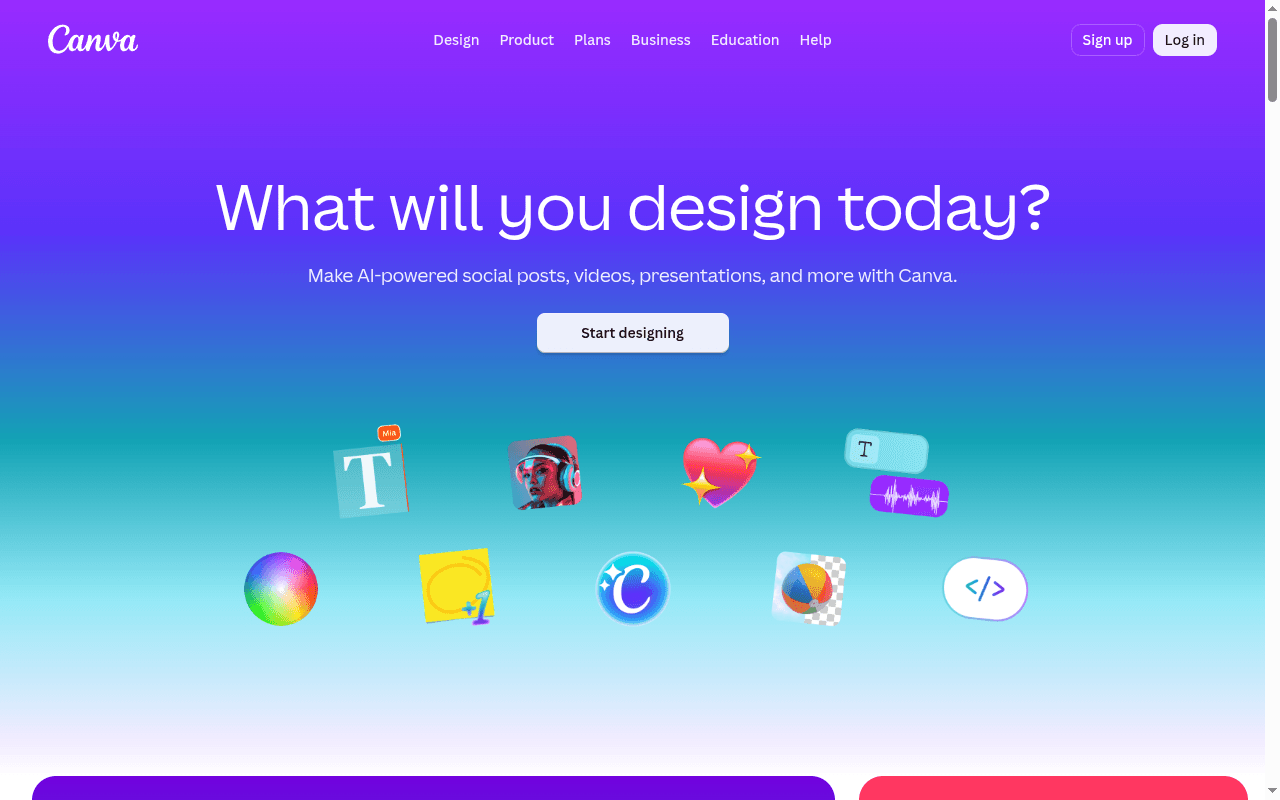
Hero H1: 'What will you design today?' + Subhead: 'Make AI-powered social posts, videos, presentations, and more with Canva.' The WHAT is clear (design tool for multiple content types), but WHO is entirely absent — no mention of target audience (creators, marketers, small businesses, students, etc.).
Add a WHO identifier to the subhead. Replace the current subhead to specify the primary audience segment, e.g., 'for creators, marketers, and small businesses' or similar.
Headline specificity
H1 'What will you design today?' is a generic, open-ended question that could apply to any design tool. It does not contain a specific outcome, number, differentiation, or concrete benefit. The subhead 'Make AI-powered social posts, videos, presentations, and more with Canva' is more specific, but the H1 itself is vague.
Replace the H1 with a more specific, benefit-driven statement that includes a concrete outcome or key differentiator (e.g., speed, ease, AI capability, breadth of formats).
Independent automated analysis by PageLint. Not affiliated with or endorsed by Canva. Findings reflect the public landing page as fetched on October 15, 2026 and may not match the current version.
How this was scored: 16 Clarity and Trust checks, each tied to a cited source (see all checks). No brand paid to be here. Canva can request a re-audit at [email protected]. The Full Report ($29 one-time) runs all 55 checks. The free landing page checker runs the same 16 checks on any public URL.
See how your page scores on the same 16 checks
Paste your URL and get a score out of 100, with each finding quoted from your page and the source behind the rule. About 60 seconds, free, no signup.
Compare Canva
- Canva vs Miro: landing page copy compared · 69 vs 80 for Miro
More design teardowns
- Miro landing page teardown · 80/100
- Figma landing page teardown · 69/100